


Linguza: AI English Tutor
3.938.00 Reviews
App Specs
- Version
- 2.1.0
- Updated On
- License
- Free
- Downloads
- 5,000,000+
- Developer
- NXL AI Solutions
- Categories
- Education
- Platform
- Android
Screenshots
 Analysis by AppCompare
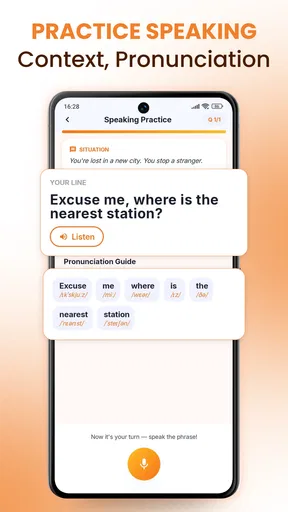
The most useful way to think about Linguza: AI English Tutor is as a place to practise speaking when a conversation partner isn’t available. Its central appeal is not a promise to replace a teacher or a complete course; it is the chance to work on spoken English with an AI tutor at a time that suits you. I find that distinction important: learners who already know some English but hesitate to use it may get more from regular, low-pressure practice than from another pile of vocabulary lists.
Linguza is a free education app from NXL AI Solutions, with optional in-app purchases. It has an average rating of 3.9 from around 4,000 ratings and more than 5 million installs. That makes it a widely used option, though the rating suggests experiences vary. I’d approach it as a practical speaking aid to try for yourself, rather than assuming it will suit every learner or teaching style.
Speaking practice is the point
I see Linguza’s main value as giving hesitant learners a low-pressure reason to speak, rather than asking them to study more rules before they feel ready. That focus is useful, but it works best when I arrive with a specific situation in mind and can talk without distractions. The next section looks at how to turn that flexibility into practice that carries over to real conversations.
A lower-pressure way to use English aloud
Many language apps make it easy to recognise a word or choose the right answer but leave a gap between that and saying something spontaneously. Linguza’s AI-tutor focus puts spoken practice at the centre. That can be especially valuable if you understand English reasonably well yet freeze when you need to respond in real time.
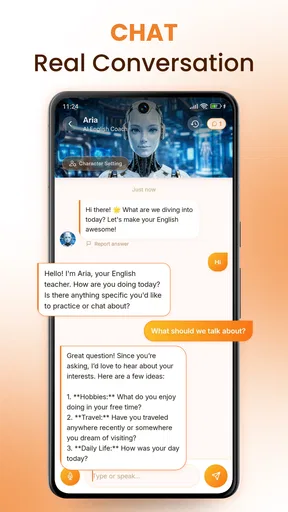
Practising with an AI can feel less exposed than speaking in a class or with a fluent stranger. You can take a moment to form an answer, try again, and build a habit without coordinating schedules. The benefit is not that every exchange will resemble a natural human conversation. It is that speaking stops being something you only attempt when the stakes are high.
The key advantage is convenience paired with active speaking: the app is designed around practising English with a tutor you can access when you want. That makes it a better fit for filling small gaps in your day than for learners whose main need is a carefully planned curriculum, detailed teacher feedback, or a recognised qualification.
Make each session about one real task
When I use a speaking tool, I get more from it by deciding what I want to practise before I start. Instead of vaguely trying to “improve English,” I might rehearse introducing myself, explaining a problem, or asking a follow-up question. A focused goal makes it easier to notice whether I can express the idea clearly, even if my grammar is not perfect.
Worth Reading Before You Choose

Flipboard Shows What News Apps Must Do Beyond the Feed

Switching to Android Auto Means Rethinking Your Driving Routine

Google Calendar Makes a Crowded Week Easier to Manage

Ludo King Makes the Most of the Minutes Between Plans

Baby Panda World Brings Quick Play to Modern Phones, but Its Game Library Feels Busy

ESPN’s Live Game View Makes Following Close Games Easier
A useful routine is to choose one situation, speak through it, and then repeat the answer in a simpler or more natural way. For example, I might first explain a missed appointment in a long, hesitant sentence, then try again with a clear reason and a polite request. This turns an AI conversation into a small rehearsal rather than an aimless chat. It also gives me something specific to practise again later.
Keep a short note after a session: the phrase you struggled to find, the point where you paused, or one sentence you want to say more smoothly next time. That simple record helps prevent practice from becoming a string of disconnected conversations. It is particularly useful if you are learning independently and need a way to see what deserves attention.
Everyday rehearsal beats waiting for the perfect lesson
A realistic use case is preparing for a work call during a lunch break. You could practise explaining a project update, describing a delay, or asking someone to clarify a point. The purpose is not to memorise a script word for word. It is to become more comfortable retrieving useful language when the conversation changes direction.
The same approach works before a trip or a routine appointment: rehearse how to ask for directions, explain a need, or confirm a detail. Keep the scenario narrow enough to practise in a few minutes. If you try to cover every possible response, you may spend more time planning than speaking.
For shy learners, the private setting can make starting easier. For busy learners, flexible access can make short practice possible without a class timetable. But the app’s convenience only helps if you actually speak rather than treating the session as background audio. I would set aside a few uninterrupted minutes, answer out loud, and give myself a clear task each time.
What an AI tutor can and cannot do
An AI conversation partner is useful for getting words out, but I would not treat it as a full substitute for human communication. Real people interrupt, change topics unexpectedly, use local expressions, and respond with social cues that an app cannot reproduce in the same way. If your goal is to handle spontaneous conversations with colleagues, customers, or friends, use AI practice as preparation and then seek real conversations too.
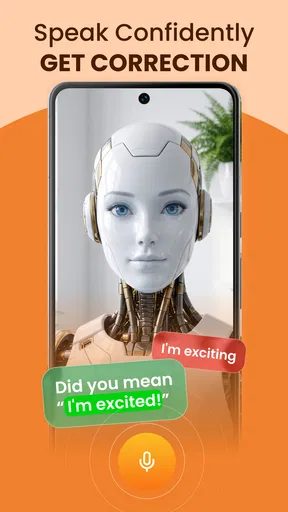
There is also a difference between receiving a response and receiving the kind of correction that changes a recurring habit. Learners who need a teacher to explain why an error matters, track progress across lessons, or adjust a structured syllabus may find a tutor or formal course more suitable. Linguza’s central promise is accessible practice, not a guarantee of comprehensive instruction.
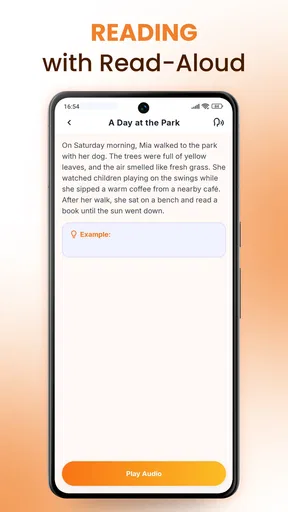
One practical trade-off is that speaking practice can feel awkward if you are in a noisy place or cannot talk freely. A quiet moment is more useful than trying to practise while people are talking around you. If speaking aloud is not possible, a reading, listening, or vocabulary exercise may be the more sensible choice for that moment; the app’s main strength is less relevant when you cannot use your voice.
Costs, age suitability, and a sensible trial
The app is free to download, while in-app purchases range from $6.99 to $89.99 per item. Because the paid options span a wide range, I would check the specific purchase details in the app before committing rather than assume that every useful part requires payment—or that a paid option is automatically worthwhile. Start by testing whether the speaking format fits your routine and whether it addresses the kind of hesitation you want to work on.
Linguza is rated for Everyone, which makes it broadly suitable by age classification, but that does not mean the learning approach will suit every child or adult. A younger learner may benefit from an adult helping set a clear practice goal, while an advanced speaker may want more nuanced feedback than short independent practice can provide. The app runs on Android 8.0 and later; its current version is 2.1.0.
The average rating of 3.9 is a reason to keep expectations measured, not a verdict that the app is either excellent or poor. A speaking app is personal: comfort with AI, the kinds of conversations you want, and your need for correction all affect whether it feels useful. I’d judge it by whether you find yourself speaking more often and whether the practice transfers to a situation you care about.
How it compares with familiar learning options
Compared with flashcard-focused language apps, Linguza’s appeal is the opportunity to practise producing spoken English rather than mainly recognising words or reviewing them. Flashcards can be better for building a dependable vocabulary base and tracking memorisation. If your biggest problem is that you cannot recall basic words, a vocabulary routine may be the better starting point, with AI speaking practice added once you have material to use.
Compared with a live online tutor, an AI tutor is more convenient for unscheduled practice and avoids the pressure of arranging a lesson with another person. A human teacher has the advantage when you need individualized explanations, a planned course, or feedback on how your communication comes across. These options solve different problems: Linguza can help you practise getting started, while a teacher can diagnose patterns and guide longer-term learning.
It also differs from simply listening to podcasts or watching English videos. Those activities can improve comprehension and expose you to natural speech, but they do not necessarily make you answer aloud. A balanced routine could pair listening for input with a short Linguza session to practise producing your own responses. The useful question is not which format is universally best, but which skill you are currently neglecting.
Who is most likely to benefit
I’d recommend trying Linguza if you can understand everyday English but need a convenient way to practise speaking without waiting for a class, a language exchange partner, or a free evening. It may also suit someone who wants to rehearse familiar situations before they happen. The strongest results are likely to come from learners who bring their own goals and return to them consistently, rather than expecting an app to decide every next step.
I’d be more cautious if you are a complete beginner who needs explanations from the ground up, if you want a human to correct subtle errors, or if your priority is exam preparation with a defined syllabus. It may also be a poor fit if you dislike speaking to AI or cannot find a comfortable place to practise aloud. In those cases, a teacher, structured course, or quieter self-study method may deliver more of what you need.
Overall, Linguza: AI English Tutor is worth considering for one clear reason: it offers a convenient way to turn spare moments into spoken-English practice. I would use it as a rehearsal partner, keep each session focused on a real situation, and combine it with human conversation or structured study when those are needed. If that matches the gap in your learning, its flexible approach is a practical place to start; if you need detailed teaching, it should be one tool in a broader plan rather than the whole plan.
A small routine that makes practice transfer
To make a short session useful beyond the app, I’d connect it to something I expect to do soon. Before a meeting, for instance, I could choose one point I need to explain and practise stating it first in plain language, then add detail only if I can do so comfortably. That order matters: it gives me a dependable core answer instead of a polished but fragile script that falls apart when someone asks a follow-up.
Afterwards, I would try the same explanation once without looking at notes. If it still comes out clearly, the practice has started to stick; if not, I have a precise target for another brief session. This is a useful way to judge progress without relying on a vague feeling that a conversation “went well.” It also keeps the tool in a supporting role: preparation is valuable, but the real test is whether I can use the language in the situation itself.
Choose the moment and the goal deliberately
Because spoken practice depends on being able to answer aloud, I would not treat every spare minute as a suitable study window. A quiet walk or an empty room may work; a crowded commute or a shared office may not. When the setting is unsuitable, I’d switch to reading or listening rather than forcing an awkward session. That is not wasted study time—it is simply matching the activity to the moment.
For someone deciding whether to install it, the practical question is whether they want a speaking partner available on demand or a more guided learning path. Linguza is strongest in the first role. I would try it with one recurring real-life task, keep the practice brief enough to repeat, and decide whether it helps me respond with less hesitation. If what I need instead is a sequenced course, careful correction, or conversation with a person, I would choose that as the main method and use AI practice only if it fills a separate gap.
Pros
- Offers AI-powered English practice on demand
- without scheduling a human tutor.
- Can provide a low-pressure space to practise speaking and build confidence.
- Personalised conversations let learners explore topics that interest them.
- Useful for fitting short practice sessions into a busy routine.
- May help learners notice gaps through immediate conversational feedback.
Cons
- AI feedback may miss nuances or occasionally suggest unnatural phrasing.
- It cannot fully reproduce the interaction and judgment of a human teacher.
- Speech practice may be less effective in noisy surroundings.
- Learners may need a stable internet connection for core features.
- Free access and available features may be limited by subscription terms.
FAQs for Linguza: AI English Tutor
What is Linguza: AI English Tutor, and who is it for?
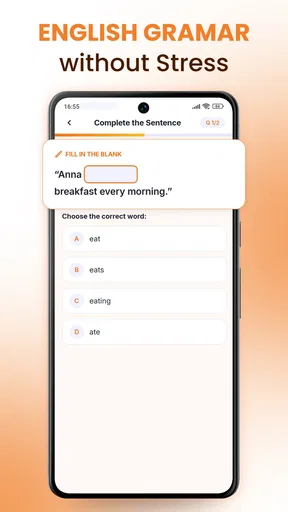
Linguza: AI English Tutor is an English-learning app built around AI-assisted practice. It may suit learners who want to work on skills such as vocabulary, grammar, speaking, or everyday conversation at their own pace. The exact lessons and tools available can depend on the current app version and your subscription. Before downloading, check the app listing to confirm that its level, learning style, and available features match your goals.
Can I practice speaking English with Linguza’s AI tutor?
The app is designed to offer AI-supported English practice, which can make it easier to rehearse conversations without arranging a lesson with another person. Speaking features may require microphone access and a quiet environment, and their availability can vary by device, region, or plan. AI feedback is useful for practice, but it may not always catch every pronunciation or grammar issue, so treat it as guidance rather than a substitute for a qualified teacher.
Is Linguza: AI English Tutor free to download and use?
The download may be free, but some lessons or AI features could require a paid plan, in-app purchase, or subscription. Check the current Google Play or App Store listing for pricing, trial terms, renewal dates, and cancellation instructions before signing up. If a free trial is offered, review when billing begins and how to cancel in your store account; availability and prices can change over time.
Does Linguza work offline, and what permissions might it need?
AI-powered tutoring generally relies on an internet connection, so you should not assume that conversations, feedback, or lesson content will work offline. Some saved materials may be available without a connection, depending on the app version. Speaking practice may request microphone access, while other permissions can depend on the features you use. Review the permission prompts and the app’s privacy information, especially if you plan to share voice recordings or personal learning details.
Is Linguza suitable for beginners, and can it replace a human English teacher?
Linguza may be useful for beginners as well as learners seeking extra practice, but the best fit depends on the levels, explanations, and learning activities currently offered in the app. An AI tutor can provide convenient repetition and practice, yet it may misunderstand answers or give feedback that misses context. For structured progress, exam preparation, or detailed correction, consider using it alongside reliable learning materials or instruction from a human teacher.


